Instructions:
How to manage/license additional users:
Caseware Cloud empowers organisations of all sizes to collaborate together in a central cloud-based platform.
If you have reached your staff limit, you can free up additional users who are not using Caseware Cloud anymore by setting them as inactive or purchasing additional users by contacting your account manager or placing an order: Place Order
How to license additional engagements:
ISAE Attestation and ISRS Agreed-Upon are licensed on a per engagement basis. If you need to purchase additional engagements, please contact your account manager or place your order below.
|
ISAE Attestation
|
ISRS Agreed-Upon
|
| Place Order | Place Order |
| Streamlined Legal Practitioner Trust and Property Practitioner Trust Account assurance engagements. | An intuitive cloud-based solution to streamline agreed-upon assurance engagements. |
LEARN MORE |
LEARN MORE |
How to manage User and Engagement licenses in Caseware Cloud:
As a firm administrator, you can view the number of users (Staff) your firm is licensed for, compared to the active users (Staff). Every active staff member will utilise one of the cloud licenses that your firm has licensed. If a user has left your firm or does not need access to Caseware Cloud anymore, you can free up the used license by setting their status to Inactive. This will reduce your overall active staff count.
Show me how to manage users in Caseware Cloud
Note: Users with active accounts who have either left your firm or should no longer have access to Caseware Cloud, could pose a security risk to your client information.
How to know when you’ve reached the user license limit in Caseware Cloud:
Once your active staff member count on Caseware Cloud is equal to your number of purchased user licenses, you will be notified by the dialogue below when you try to add an additional active staff member.
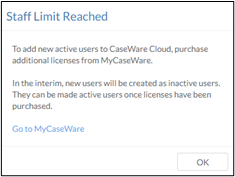
You will be able to continue creating the new staff member, however they will remain inactive until you have enough available licenses.
Rate this article:
|vote=None|
Processing...
(Popularity = 0/100, Rating = 0.0/5)
Related Articles
ISAE Attestation | How to roll forward an engagement
ISAE Attestation | Uploading documents in the ISAE Attestation Application
ISAE Attestation | Latest release
ISAE | How to create a new engagement in the ISAE Attestation Application
ISAE Attestation | Latest release
view all...